Pixdraw: A Playful, Pixel-Perfect Display Font for Crafters
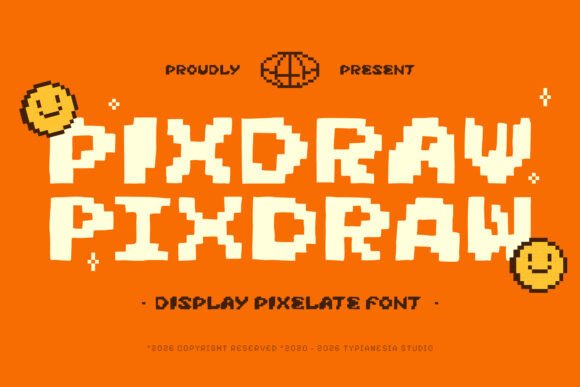
If you’ve ever spent 20 minutes tweaking kerning on a Cricut project only to realize the font just doesn’t *pop* on a kraft tag—or watched a digital printable lose its charm when scaled down for sticker sheets—you know how much hinges on the right display font. That’s why Pixdraw landed in my design folder and stayed: it’s not just another pixel font. It’s an organic imperfect doodle pixel font—bold, vibrant, and full of intentional quirks that make handmade products feel human, joyful, and unmistakably yours.
Pixdraw reimagines retro game typography with warmth and wit. Unlike rigid, grid-perfect pixel fonts, Pixdraw leans into charming imperfection—the slight wobble in a diagonal stroke, the uneven baseline, the hand-drawn weight shifts that mimic inked doodles translated into pixels. It’s nostalgic without being kitschy, playful without sacrificing clarity, and bold enough to command attention on a shelf or screen. As a crafter who prints labels for small-batch candles, designs wedding welcome boards, and sells SVG bundles for Silhouette users, I need typefaces that hold up across formats—and Pixdraw delivers, whether laser-cut on wood, printed on matte sticker paper, or embedded in a Canva template.
For physical product makers, Pixdraw shines where personality meets practicality. Try it for:
- Candle & soap labels—its chunky, friendly letterforms read clearly at 12–16 pt on 2” x 3” kraft tags, especially when paired with a clean sans serif for ingredients or scent notes;
- Farmhouse-style signs and wall art—use it for titles like “Gather Here” or “Good Coffee, Better Company” over distressed wood or chalkboard prints;
- Birthday invitations and party printables—Pixdraw adds instant energy to “Happy Birthday, Maya!” or “Let’s Taco ‘Bout It!” without overwhelming delicate watercolor backgrounds;
- Wedding stationery accents—think “Welcome” on a rustic chalkboard sign, “Bar” above a DIY drink station, or “RSVP” on a tear-off card (just avoid using it for full address blocks—it’s a display font, not a text face);
- Seasonal packaging—“Spooky Sweets” on Halloween treat bags, “Cozy & Crisp” on autumn candle boxes, or “Jingle All the Way” on holiday mug wraps—all benefit from Pixdraw’s tactile, almost tangible presence.
Readability is where Pixdraw truly earns its keep in production. Because each glyph is carefully balanced—not overly tight, not too loose—it cuts cleanly on Cricut and Silhouette machines, even at 0.25” height for tiny enamel pin text or 4” width for large-scale signage. On printed cards and stickers, it avoids the “fuzzy pixel bleed” some low-res fonts suffer from—thanks to its optimized vector outlines and thoughtful spacing. For mockups and digital previews, it renders crisply in Etsy thumbnails and Instagram story graphics, helping your listings stand out before a single click.
Pixdraw works best for short, high-impact phrases: names, titles, slogans, product categories (“Small Batch,” “Hand-Poured,” “Vintage Vibes”), and decorative headings. Avoid long paragraphs or fine print—it’s designed to grab, not guide. That said, its expressive character makes it ideal for logo lockups, social media banners, and brand headers in your shop’s visual identity. When customers see Pixdraw on your label, then your website, then your packaging tape, it quietly reinforces consistency—not through rigidity, but through shared spirit.
Pairing Pixdraw thoughtfully elevates your whole design system. Try it with:
- A relaxed script font (like a gentle brush script) for contrast—Pixdraw as “SWEET TREATS,” followed by “Handmade with Love” in flowing cursive;
- A warm, neutral sans serif (think Montserrat or Poppins Light) for supporting text—perfect for ingredient lists, care instructions, or event details;
- An understated serif (such as Lora or Merriweather) for vintage-inspired wedding suites, where Pixdraw handles “Mr. & Mrs.” and the serif carries the ceremony time and location.
The font includes standard OpenType features—ligatures for natural “fi” and “fl” connections, stylistic alternates for extra doodle flair, and multilingual support covering Western European languages. File formats include OTF and TTF, so it installs smoothly on Mac and Windows, plays well with Design Space, Cricut Design Space, Silhouette Studio, Adobe Creative Cloud, and free tools like Canva and Inkscape.
Crucially, Pixdraw comes with a commercial license—meaning you can use it to create and sell physical products (mugs, tote bags, greeting cards), digital downloads (planner pages, invitation templates, SVG cut files), and client work (logo designs, boutique branding). Just remember: you’re licensing the font for *your output*, not redistributing the font files themselves. That distinction keeps your shop compliant and protects your creative labor.
In a market flooded with generic “retro” fonts, Pixdraw stands out because it feels made—not generated. Its organic imperfections echo the values we crafters embody: authenticity, care, and joyful imperfection. Whether you're labeling a jar of lavender honey, designing a printable “Baby’s First Halloween” banner, or building a cohesive brand for your handmade ceramics line, Pixdraw doesn’t just sit on the page—it invites connection. And in handmade commerce, that’s the quiet magic that turns a buyer into a believer.